2026 mein website banana pehle se bilkul alag ho gaya hai। पहले website banane के लिए coding सीखनी पड़ती थी, HTML CSS JavaScript सीखना पड़ता था या महंगे developers hire करने पड़ते थे।
designer से layout बनवाना पड़ता था और महीनों लग जाते थे। लेकिन अब AI tools ने सब बदल दिया है। आज आप बिना एक भी लाइन code लिखे, बिना designer hire किए, सिर्फ अपनी business idea बताकर professional looking website बना सकते हो।
ये no-code revolution है जहां AI खुद layout decide करता है, images generate करता है, text likhta है और SEO friendly bhi banata है।
खासकर small business owners, freelancers, bloggers, local shops और students के लिए ये game changer है। पहले 50 हजार से 5 लाख रुपये तक खर्च होता था, अब 500 से 5000 रुपये महीना में सब हो जाता है।
AI website builders अब इतने smart हो चुके हैं कि वे आपकी बात सुनकर पूरा site structure बना देते हैं। images, colors, fonts, content सब auto generate। अगर आप सोच रहे हो कि AI se website kaise banaye तो ये guide आपके लिए ही है।
हम step by step सब बताएंगे, top tools cover करेंगे और real budget भी देखेंगे। beginner हो या experienced, सबके लिए helpful होगी। चलिए शुरू करते हैं।
Top 3 AI Website Builders (Handpicked)
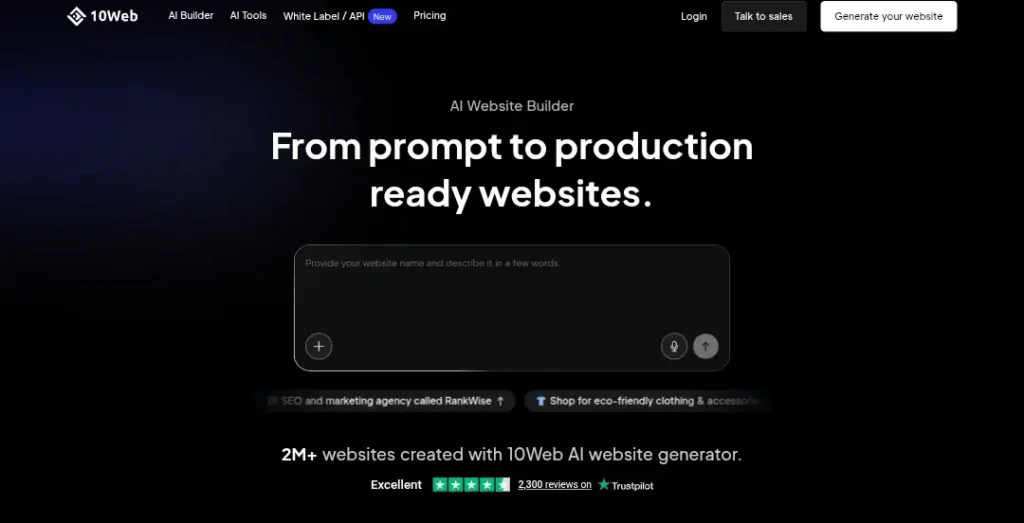
2026 में कई AI website builders हैं लेकिन हम सिर्फ उन तीन को cover करेंगे जो true AI हैं। मतलब वे सिर्फ template नहीं देते बल्कि आपकी बात सुनकर पूरा site खुद बनाते हैं।
पहला है 10Web / Elementor AI। ये WordPress lovers के लिए best है। अगर आपको WordPress का power चाहिए लेकिन coding से दूर रहना है तो 10Web AI सबसे अच्छा option है। ये AI से full WordPress site generate करता है।
Elementor AI integration से pages, sections, images सब auto बनते हैं। hosting भी included है। speed बहुत fast है और SEO tools built-in हैं। WordPress plugins support करता है। अगर आप future में custom code add करना चाहते हो तो ये flexible है।
दूसरा है Durable / Framer AI। ये speed और design के लिए king है। आप बस business name और type बताओ, AI 30 सेकंड में पूरा site बना देता है। design बहुत modern और clean लगता है।
Framer AI से animations और interactions auto add हो जाते हैं। mobile responsive 100 प्रतिशत। अगर आप creative agency या personal portfolio चाहते हो तो Durable बहुत fast काम करता है।
तीसरा है Hostinger AI Website Builder। beginners और low budget वालों के लिए best। बहुत सस्ता है और super easy। आप industry चुनो, business details दो और AI पूरा site बना देता है।
hosting, domain सब एक जगह। images और text AI generate करता है। अगर आप पहली बार website बना रहे हो और 1000 रुपये महीना से कम में करना चाहते हो तो Hostinger perfect है।
ये तीन tools 2026 में सबसे powerful true AI builders हैं। बाकी tools template based हैं लेकिन ये तीन real AI से site बनाते हैं।
Step-by-Step Guide: 5 Minute mein Site Kaise Banayein?
चलिए अब practical guide देखते हैं। मान लो आप एक छोटी coffee shop के लिए site बनाना चाहते हो।
सबसे पहले tool चुनो। beginners के लिए Hostinger से शुरू करो। hostinger.com पर जाओ और AI Website Builder चुनो। free trial या plan select करो।
अब prompt strategy बहुत important है। AI को साफ साफ बताओ।
Example Prompt: “मुझे एक modern coffee shop website चाहिए। homepage पर hero image with coffee cup, menu section, about us, contact form, location map।colors brown and cream, font elegant, mobile friendly। business name: Mountain Brew Coffee, Uttarakhand based।” जितना detail दोगे उतना अच्छा result आएगा।
AI generate करने के बाद site ready हो जाता है। अब customization। colors change करने के लिए AI से कहो “primary color को dark brown कर दो” या “font को sans-serif modern कर दो”। layout adjust करो, sections drag drop से move करो।
images सही न आएं तो AI से regenerate करवाओ “इस section में fresh coffee beans वाली high quality image generate करो”। text edit करो या AI से rewrite करवाओ “about us section को और attractive लिख दो”।
5 मिनट में basic site तैयार। preview में mobile और desktop दोनों check करो। publish button दबाओ। domain connect करो। सब हो गया। ये process Durable और 10Web में भी same है, बस interface थोड़ा अलग। practice करने से 2-3 मिनट में हो जाता है।
Content & Images: AI Copywriting
Website का content और images बहुत matter करते हैं। AI से copywriting बहुत आसान है।
About Us page के लिए AI को prompt दो: “हमारे coffee shop Mountain Brew के बारे में 200 शब्द का attractive paragraph लिखो। Uttarakhand के mountains से inspired, fresh local beans use करते हैं, cozy atmosphere, family run business। friendly tone।” AI पूरा paragraph देगा।
फिर आप थोड़ा edit कर लो personal touch के लिए। Services या Menu page के लिए: “coffee menu list बनाओ with prices, descriptions। cappuccino, latte, cold brew आदि।” AI table format में देगा।
Images के लिए integrated AI यूज करो। Hostinger में built-in image generator है। prompt दो “fresh cappuccino with foam art, cozy cafe background, high resolution”। copyright free images मिलेंगे। अगर tool में Midjourney या DALL-E integration है तो और बेहतर quality मिलेगी।
10Web में Elementor AI से section wise images generate कर सकते हो। हमेशा prompt में “copyright free, commercial use” add करो। content को human touch दो, AI text को पढ़कर अपनी language में change करो ताकि natural लगे।
The SEO Angle
AI website को Google पर rank करवाना जरूरी है। सबसे पहले Google Search Console में setup करो। site publish होने के बाद Google Search Console पर जाओ। property add करो। verification के लिए HTML tag या DNS record यूज करो। sitemap submit करो (AI builder खुद generate करता है)।
AI-generated content को human-touch दो। Google spam detect करता है अगर 100 प्रतिशत AI text है। इसलिए AI text को पढ़ो, अपनी sentences add करो, personal stories डालो।
keywords naturally यूज करो जैसे “best coffee in Uttarakhand”। meta title और description AI से generate करवाओ लेकिन edit करो। alt text images में डालो “mountain brew coffee cappuccino”।
mobile friendly check करो। page speed test करो। AI builders अब fast loading देते हैं। backlinks के लिए local directories में list करो। blog section add करो और AI से articles लिखवाओ। regular update से ranking improve होती है।
Cost Analysis (Budgeting)
AI website बनाना बहुत sasta है। domain .com 500-1000 रुपये सालाना। hosting AI builder में included होता है।
Hostinger AI Builder: 299 रुपये महीना से शुरू (promo में)। domain free first year। total first year 3500-4000 रुपये।
Durable: 12 डॉलर महीना (लगभग 1000 रुपये)। domain extra। total 12000 सालाना।
10Web: 10 डॉलर से शुरू (WordPress hosting included)। total 10000-15000 सालाना।
Manual designer: 30000 से 2 लाख तक one time + hosting 5000 सालाना।
AI से 80-90 प्रतिशत saving। maintenance भी free। updates auto। small business के लिए AI बहुत budget friendly है।
Pros & Cons of AI Websites
Pros: time saving, बहुत कम समय में site ready। low cost, हजारों में सब हो जाता है। no technical skill needed, beginner भी बना सकता है। fast launch, 1 दिन में live। auto SEO basics, mobile responsive। regular updates और security AI builder handle करता है।
Cons: limited custom features, बहुत complex functionality जैसे advanced e-commerce में problem। branding limitations, सब sites थोड़े similar लग सकते हैं। AI content कभी robotic लगता है। scalability issue अगर business बहुत बड़ा हो जाए। dependency on platform, migration मुश्किल।
Verdict & Next Steps
small business, local shop, freelancer, portfolio, blog के लिए AI website best है। बहुत fast, cheap और easy। लेकिन big e-commerce site, custom marketplace या complex app integration के लिए traditional developer या hybrid approach बेहतर। शुरू में AI से site बनाओ, traffic आए तो upgrade करो।
Next steps: आज ही Hostinger या Durable खोलो। simple prompt दो। site generate करो। customize करो। publish करो। Google Search Console setup करो। content edit करो। social media पर share करो। practice से बेहतर होते जाओगे।
FAQs
क्या बिना coding के professional website बन सकता है?
हां बिल्कुल। Hostinger, Durable, 10Web जैसे AI tools से 5 मिनट में site ready हो जाता है।
AI website बनाने में कितना खर्च आता है?
शुरू में 300 से 1000 रुपये महीना। domain extra 500-1000 सालाना। manual से बहुत कम।
AI से बना content Google पर rank करता है?
हां लेकिन human touch दो। keywords naturally यूज करो और original value add करो।
कौन सा tool beginners के लिए best है?
Hostinger AI Builder। बहुत आसान और सस्ता।
AI website में e-commerce लगा सकते हैं?
हां छोटे level पर। लेकिन large store के लिए Shopify या WooCommerce बेहतर।
images copyright free मिलते हैं?
हां AI generated images commercial use के लिए safe हैं।
site mobile पर अच्छा दिखता है?
हां सभी AI builders 100 प्रतिशत responsive बनाते हैं।
domain और hosting कैसे connect करें?
tool में ही option होता है। AI builder खुद guide करता है।
AI website secure होता है?
हां SSL free मिलता है। regular updates auto।
अगर future में change करना हो तो?
AI से ही regenerate करो या edit करो। migration भी possible है।
दोस्तों ये थी AI se website kaise banaye की complete guide। ये रहे कुछ और useful tutorials जो आपकी काफी हेल्प करेंगे:
- AI Se Prompt Kaise Banaye: basics से advanced तक। अच्छे prompts से images, videos, code सब perfect मिलेगा
- ChatGPT Se Paise Kaise Kamaye 2026 में: जानें पूरे step by step tutorial
- AI se app kaise banaye – बिना coding फ्री में अपना app तैयार करके पैसे कमाएं
About The Author