Midjourney ek powerful AI tool hai जो text prompt से बेहतरीन photos और artistic images बना देता है। 2026 में ये दुनिया के सबसे पॉपुलर AI image generators में शामिल है क्योंकि इसमें artistic style, cinematic lighting और creative composition बहुत मजबूत है। DALL-E या Canva से तुलना करें तो Midjourney कई मामलों में आगे है।
DALL-E आसान है लेकिन artistic depth कम है और faces कभी inconsistent हो जाते हैं। Canva beginners के लिए अच्छा है लेकिन pro level cinematic या fantasy images में कमजोर है। Midjourney में parameters जैसे aspect ratio, stylize और version control से आप exact वही result पा सकते हो जो चाहते हो।

community भी बहुत active है जहां लाखों creators रोज नए styles share करते हैं। अगर आप Instagram reels, YouTube thumbnails, concept art या professional posters बनाना चाहते हो तो Midjourney सबसे अच्छा विकल्प है।
ये tool Discord और web दोनों पर चलता है और 2026 में web interface बहुत सुधार चुका है। अब कोई भी beginner बिना coding या extra software के stunning photos बना सकता है।
2026 में Midjourney use karne ke do tarike Discord versus Web
2026 में Midjourney को दो मुख्य तरीकों से इस्तेमाल किया जा सकता है। पहला पुराना तरीका Discord app या web पर है जहां आप bot के साथ chat करके commands टाइप करते हो। दूसरा नया और आसान तरीका official website midjourney.com पर है।
Discord में community का मजा आता है क्योंकि वहां दूसरे creators से सीधे interact कर सकते हो और उनके prompts देख सकते हो। लेकिन beginners के लिए interface थोड़ा confusing लगता है क्योंकि सब text commands से होता है। वहीं website पर सब visual है।
आप drag and drop से images upload कर सकते हो, sliders से parameters adjust कर सकते हो और unified editor में direct edit भी कर सकते हो। website में inpainting, outpainting और vary region बहुत आसान है जबकि Discord में ये थोड़ा manual है।
2026 में Midjourney ने website को main platform बना दिया है क्योंकि इसमें new features पहले आते हैं। अगर आप शुरू कर रहे हो तो website से शुरू करें। Discord सिर्फ community और quick experiments के लिए रखें। दोनों में subscription एक ही है इसलिए आप चाहें तो दोनों इस्तेमाल कर सकते हो। website beginners के लिए ज्यादा user friendly है और time बचाता है।
Step by step Midjourney website setup new method
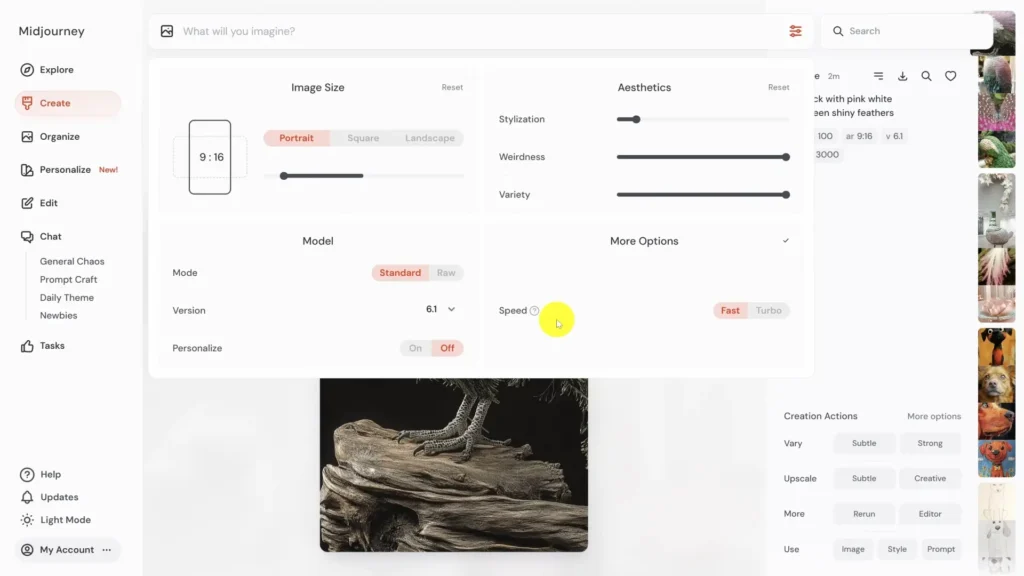
Midjourney website पर setup करना बहुत आसान है। सबसे पहले midjourney.com पर जाओ। Google account या Discord account से login करो। अगर आपके पास Midjourney subscription है तो तुरंत dashboard खुल जाएगा। नया user हो तो पहले subscription प्लान चुनो। login करने के बाद Create tab पर क्लिक करो। यहां interface साफ है।
ऊपर prompt box है जहां आप text लिखते हो। बाईं तरफ image upload का ऑप्शन है जहां आप reference photos डाल सकते हो। नीचे parameters के लिए dropdowns और sliders हैं जैसे aspect ratio, version, stylize। image upload करने के लिए simply drag and drop करो या upload button दबाओ। prompt लिखने के बाद Imagine बटन दबाओ।
generation शुरू हो जाएगा। website में gallery भी है जहां आपके सभी previous images दिखते हैं। आप वहां से directly remix, upscale या edit कर सकते हो। setup पूरा होने में सिर्फ दो मिनट लगते हैं। अगर Discord account से login करोगे तो दोनों platforms link हो जाएंगे।
website में voice prompting भी available है ताकि आप बोलकर prompt दे सको। ये नया method पुराने Discord तरीके से ज्यादा fast और intuitive है।
Essential commands and parameters the cheat sheet
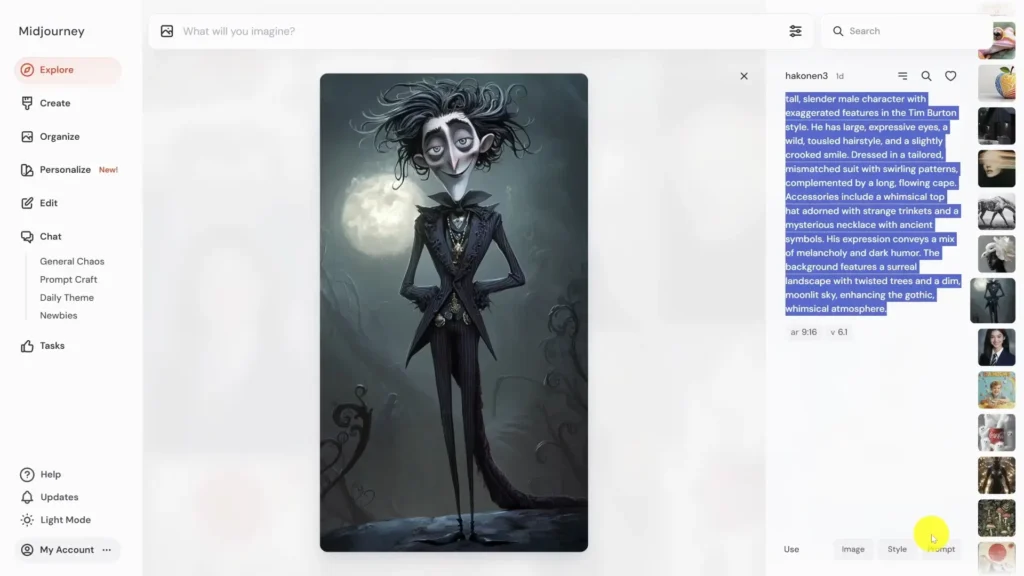
Midjourney में कुछ commands और parameters बहुत महत्वपूर्ण हैं जो result को control करते हैं। aspect ratio के लिए –ar लिखो। YouTube thumbnail के लिए –ar 16:9 यूज करो। Instagram reels या stories के लिए –ar 9:16 best है। profile picture के लिए –ar 1:1 रखो। latest version यूज करने के लिए –v 7 लिखो क्योंकि 2026 में v7 सबसे advanced है।
stylize parameter से artistic feel कंट्रोल होता है। –stylize 750 डालो तो ज्यादा artistic और creative result आएगा। –stylize 100 रखो तो realistic photos आएंगे। negative prompts के लिए –no यूज करो। उदाहरण के लिए अगर आप blurred background नहीं चाहते तो prompt के अंत में –no blur लिखो।
unwanted elements जैसे extra hands या deformed faces को –no deformed, extra limbs से हटा सकते हो। 4K quality के लिए –q 2 या –q 4 यूज करो लेकिन ये GPU time ज्यादा लेता है। seed value –seed से same style repeat कर सकते हो। ये parameters prompt के अंत में space देकर लिखो।
website पर ये sliders से भी set हो जाते हैं इसलिए beginners को आसानी होती है। practice से आप इन commands को master कर लोगे और हर बार perfect result पाओगे।
Masterclass perfect prompt kaise likhein
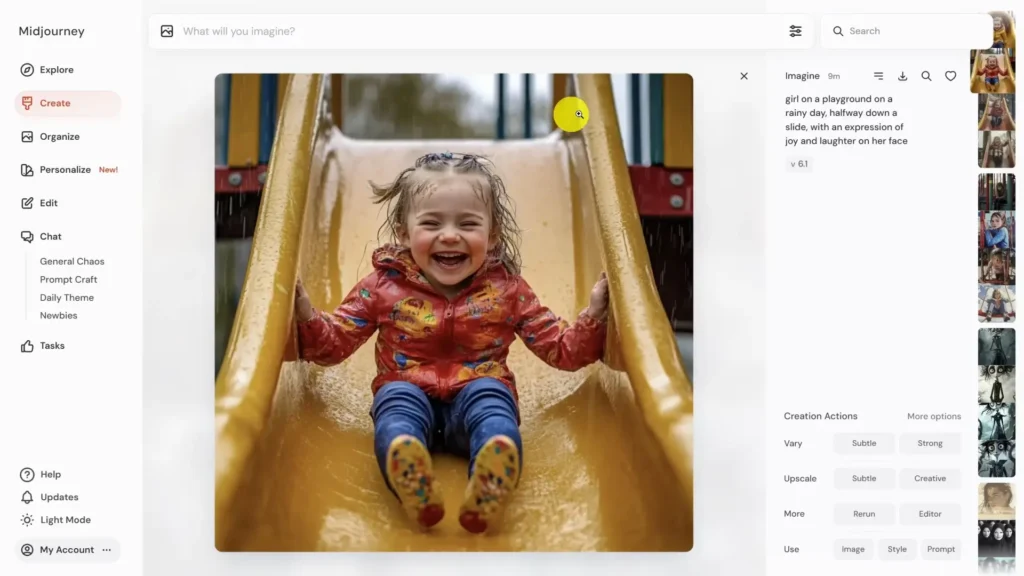
Midjourney में अच्छा prompt लिखना सबसे जरूरी skill है। simple prompt जैसे “एक पुराना किला” से random result आएगा। descriptive prompt लिखो ताकि AI exact समझे। उदाहरण के लिए लिखो “cinematic 8k photo of an ancient Indian fort during golden hour sunset, detailed stone walls, dramatic clouds, highly realistic, photorealistic lighting, sharp focus”।
इसमें subject, lighting, style, quality और details सब शामिल हैं। English में लिखो लेकिन Hindi ideas mix कर सकते हो। adjectives जैसे majestic, vibrant, detailed, 8k, cinematic, photorealistic जरूर ऐड करो। reference images upload करके prompt में –cref या –sref यूज करो।
negative prompt भी साथ में लिखो ताकि unwanted चीजें न आएं। पहले simple prompt ट्राई करो फिर details बढ़ाओ। website में magic prompt feature भी है जो आपके short idea को full descriptive बना देता है। practice रोज करो तो एक हफ्ते में आप pro level prompts लिखने लगोगे। descriptive prompts से faces consistent रहते हैं और composition professional लगती है।
Advanced features the authority section
Midjourney में advanced features से आप professional level control पा सकते हो। character reference –cref बहुत powerful है। एक reference image upload करो और prompt में –cref image url लिखो। इससे faces हर generation में same रहेंगे। storytelling या series बनाने के लिए perfect है।
style reference –sref से एक photo का पूरा artistic style दूसरी image पर apply कर सकते हो। उदाहरण के लिए एक oil painting style की photo upload करके –sref यूज करो तो नई images उसी painting जैसी आएंगी। vary region feature से photo के किसी एक हिस्से को edit कर सकते हो।
website editor में brush tool से area select करो और नया prompt दो। बाकी image वही रहेगी। inpainting और outpainting भी इसी से होता है। ये features 2026 में website पर और बेहतर हो गए हैं। Discord में भी available हैं लेकिन website में visual brush से बहुत आसान है। advanced users इनसे consistent characters, brand style और precise edits बना सकते हैं।
Pricing and free alternatives
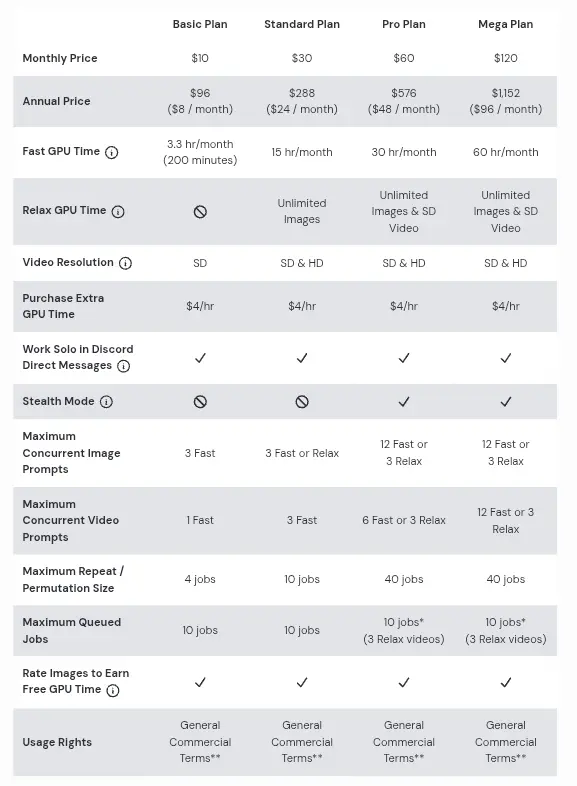
2026 में Midjourney subscription based है। Basic plan $10 महीना से शुरू होता है जिसमें लगभग 200 images fast mode में मिलते हैं। Standard plan $30 महीना में 15 घंटे fast GPU time और unlimited relax mode मिलता है। Pro plan $60 महीना में stealth mode, ज्यादा concurrent jobs और commercial use के लिए best है।
Mega plan $120 महीना में heavy users के लिए unlimited जैसा feel देता है। annual billing पर discount मिलता है। free trial अब नहीं है लेकिन कुछ users website पर limited generations ट्राई कर सकते हैं। अगर budget कम है तो free alternatives जैसे Flux या Ideogram यूज करो।
Flux photorealistic images में बहुत अच्छा है और free trials देता है। Ideogram text rendering में strong है और free limited generations देता है। Midjourney pro level artistic style के लिए unmatched है लेकिन शुरू में free tools से practice करो।
Legal and ethics
Midjourney से बनी photos का copyright आपका होता है अगर आप paid subscriber हो। आप इन्हें commercial use में बेच सकते हो, print कर सकते हो या business में यूज कर सकते हो। लेकिन अगर आपकी company $1 million से ज्यादा revenue कमाती है तो Pro या Mega plan जरूरी है। free users को कोई commercial rights नहीं मिलते।
दूसरों की images upscale करके बेचना allowed नहीं है। trademark या copyrighted characters जैसे Disney, Marvel को copy करना illegal है। ethics के हिसाब से AI images में disclose करो कि ये AI generated हैं। plagiarism से बचो और original prompts यूज करो।
Midjourney terms of service पढ़ो ताकि कोई violation न हो। commercial projects में license clear रखो। ये rules 2026 में और strict हो गए हैं लेकिन paid users के लिए सब smooth है।
दोस्तों अब आप जान गए होंगे कि Midjourney से photo कैसे बनाएं। website से शुरू करो, अच्छे prompts लिखो, parameters यूज करो और advanced features सीखो। practice से आप जल्दी pro बन जाओगे। आज ही midjourney.com पर जाओ और पहला prompt ट्राई करो।
artistic photos बनाकर Instagram या YouTube पर share करो। Midjourney ने creative दुनिया बदल दी है। आप भी हिस्सा बनो और कुछ कमाल की images create करो। अगर कोई doubt हो तो comment में पूछो। अगले article में और advanced tips दूंगा।
अब जाओ और कुछ creative photos बना दो।
About The Author